Need help with a specific project?Share your brief

Video Aspect Ratio For Social Media

Written by Amy on • min read •Community
Video aspect ratio is the relationship between the width and height of an image. You express the aspect ratio with two numbers and a colon, for example, 4:3 four-to-three.
In filmmaking, the aspect ratio is how you format a video for the screen. The problem is that social media videos all have different aspect ratios. So, when you record and export your video, you will need to prepare it in different formats and sizes.
To help you with your video making, we have put together the following guide with all the information you need on video aspect ratios, formatting and exporting video.
What Is A Video Aspect Ratio?
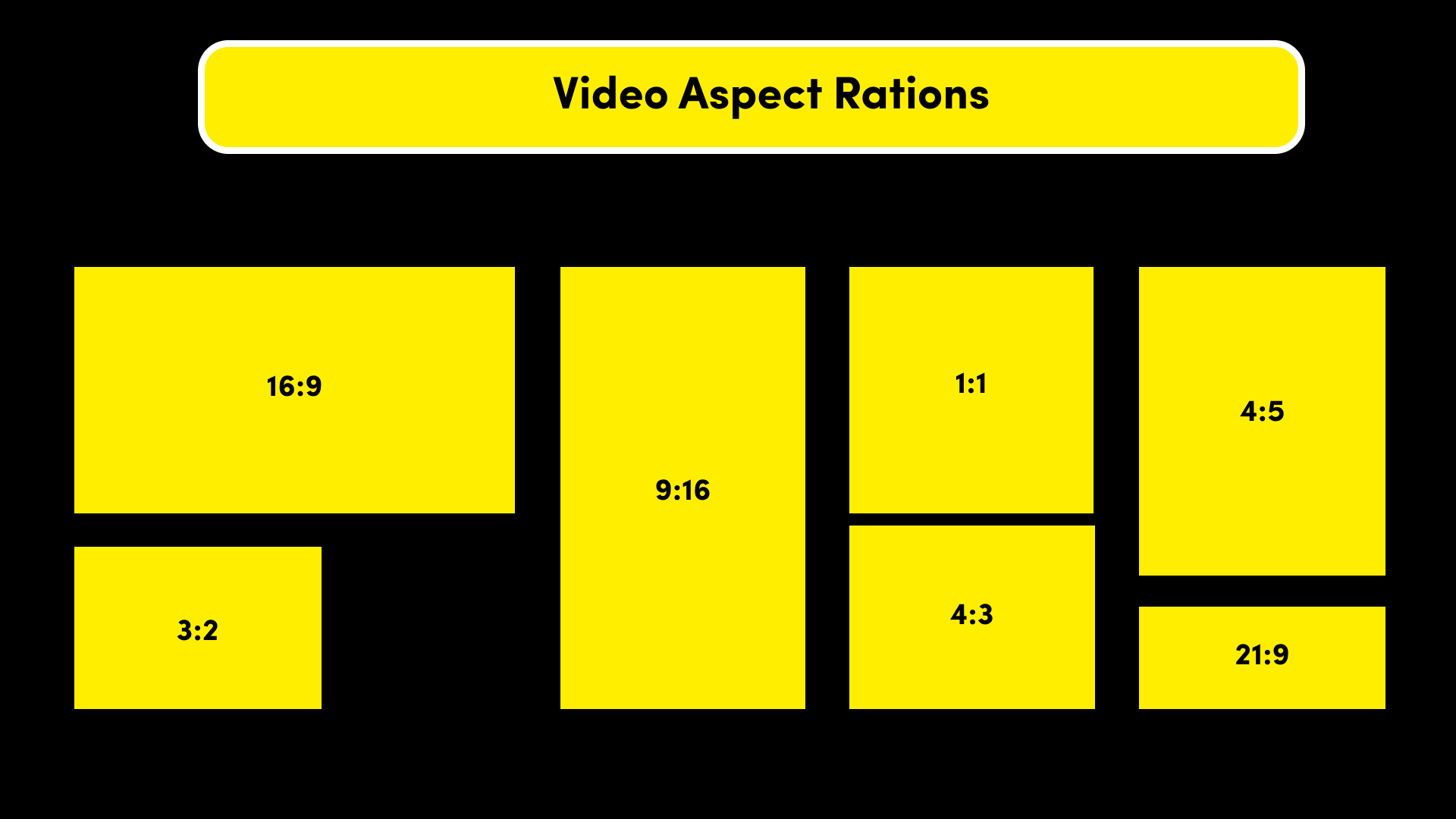
The video aspect ratio is a number that describes the shape of a video’s width and height. You use aspect ratios in both film and photography, with major ratios being 4:3, 16:9, and 9:16. The first number describes the image’s width and the second number is the height.

Having universal aspect ratios allows videos worldwide to fit onto social media platforms. If you don’t use the correct aspect ratio, your video might become squashed or cut incorrectly. So, creators must all use the same aspect ratios to showcase their work.
Social Media Video Aspect Ratios
There are two main ways to record a video, landscape (television, YouTube videos) or portrait (phones, YouTube shorts). Next, you will need to decide if you want your video full screen or with a letterboxed effect, creating black padding on either side of your video.
You don’t necessarily need to follow the social media guidelines if you want a unique effect. For example, creating a video deliberately in a square format (1.1). Conveniently mobile phones record in the correct ratios when held horizontally (16:9) and vertically (9:16).
- YouTube – 16:9
- YouTube Shorts – 9:16
- Instagram Reels – 9:16
- Instagram Feed – 1:1
- TikTok – 9:16
- LinkedIn – 16:9
- Pinterest – 1:1 or 9:16
- Facebook – 1.1 or 16:9
- Twitter – 16:9
Video Aspect Ratio Vs Resolution
In filmmaking, the video aspect ratio and resolution are closely linked. These are the two numbers you need to know when exporting your video. The video aspect ratio describes the screen shape, the video resolution describes the number of pixels in the video.
Briefly, the higher the resolution number the higher the quality of video. In video, there are three main resolutions for a 16:9 video, 720P, 1080P and 2160P (also known as 4K). For portrait videos, your resolution is 1080 X 1920, which also translates to 9:16.
If you shoot on a mobile phone, you don’t need to worry about resolution. However, if you use a video camera like a DSLR, you will want to determine the resolution before you shoot. In general, 1080P for video, unless you want to shoot on a maximum 4K resolution.

Book photoshoot & film locations
Scouty helps you find and book locations online. Our locations include green screen studios, location houses, warehouses, and other unique places for photo shoots and filming.
Types of Video Aspect Ratios
There are a few different aspect ratios you are likely to come across in video making. You will find that it’s important to understand these terms when pitching to clients and also during the editing room. To help, we have put together the main aspect ratios for social media.
16:9 Video Aspect Ratio
This is the most common widescreen video aspect ratio. You will see this everywhere from television, YouTube videos, streaming platforms and it’s ratio of your smartphone landscape (horizontal). Most mobile phones, DSLR’s and video cameras shoot in this format by default.
9:16 Video Aspect Ratio
In contrast, you have portrait (vertical) videos that you will find on your smartphone. It is directly the 16:9 flipped and the go to for all portrait smartphone videos. You can find this aspect ratio on TikTok videos, Snapchat, Instagram Reels and YouTube shorts.
1:1 Video Aspect Ratio
The 1:1 is a perfect square aspect ratio and the go-to for Instagram feed photos. Because of this, you can also use 1:1 for Instagram feed videos and carousel content. In addition, the perfect square video is accepted on Facebook videos and Pinterest Videos.
4:3 Video Aspect Ratio
Before you had widescreen television, you had full-screen television. The 4:3 aspect ratio was the go-to for television shows and all video cameras before the 2000s. It looks similar to a square, but it is a little wider. It’s no longer the preferred aspect ratio for social media.
21:9 Video Aspect Ratio
The largest screen sizes are called cinematic, anamorphic or ultra widescreen. You can find this within Hollywood movies to create a more cinematic look. Furthermore, you can also shoot a movie for IMAX, which projects the film onto a very large cinema screen.

Book photoshoot & film locations
Scouty helps you find and book locations online. Our locations include green screen studios, location houses, warehouses, and other unique places for photo shoots and filming.
Formatting Aspect Ratios
Before you shoot your video, you should know your video aspect ratio. First, consider how you plan to promote your videos and on which social media. If you want to shoot for just one platform, pick the recommended settings, however, you can shoot for multi-platform.
Shooting one video for multiple platforms will require you to shoot big and crop later. For example, to shoot for both YouTube 16:9 and TikTok 9:16, you can shoot vertically and then crop horizontally later. That way, you have both a horizontal and vertical video in one shoot.
However, this does get more complicated for 1:1 videos, as you may need to adjust your video composition to meet a range of aspect ratios. Lastly, check that your camera is in the correct aspect ratio, mobiles will shoot atomic, but a DSLR will need to be set manually.
Exporting Aspect Ratios
Most video editing software automatically chooses an aspect ratio when you import your video. However, you should always double-check that you are editing in the correct setting. If editing a video for multiple social platforms, you will need to create different projects.
For Adobe Premier Pro users, you can adjust your aspect ratio of any sequence. To do this, click the settings tab and check the frame size of your timeline and video. It will list the aspect ratio and also the resolution. If you want to change it, you can edit the video settings.
If you are using Final Cut Pro, you will see a property window on the right top of the screen. In this window, you will find a modify option, here you can alter the video aspect ratio. We hope, you know more about video aspect ratios and how they shape your videos.